


Unattended remote access means a technician can connect to a computer when nobody is sitting at it. A small program, installed once, lets them in without anyone reading out a code or clicking Allow each time something breaks.
It is convenient. It is also the kind of access you should ask hard questions about.
Who can connect? When? Will I know about it? What gets written down?
Here is how we answer those questions at GoProIT, for the remote support software we install on Business Support Plan computers.
The short version
- Unattended access is only on computers covered by the Business Support Plan. One-time fixes use a temporary connection that you approve.
- Only authorized GoProIT technicians can connect, and they sign in with two-step login.
- Your computer shows a notice whenever a technician opens the screen, the command line or the files.
- We connect for a request you made, or for maintenance we told you about in advance.
- Every connection is logged with the technician’s name, the date and the time.
What unattended remote access means
Remote support comes in two kinds, and the difference is who has to be at the keyboard.
Attended support is the kind most people have seen. You call, the technician sends a link or a code, you approve the connection and you watch the fix happen.
When the session ends, the connection is gone. That is how our one-time remote repair sessions work.
Unattended access uses an agent: a small program that stays installed and starts with Windows. A technician with the right account can reach that computer without someone approving each session. It is what lets us fix the front-desk PC while its owner is with a customer, or finish a slow job after the office has emptied out.
| Question | Attended session | Unattended access |
|---|---|---|
| Who starts it | You approve each session | A technician connects when the work is due |
| What stays installed | Nothing | A small agent |
| Someone at the PC | Required | Not required |
| Where we use it | One-time fixes | Business Support Plan computers |
| What you see | The whole session | A notice, plus a bar while your screen is viewed |
Neither kind is better in every case. Attended sessions suit a single problem. Unattended access suits an office that wants its remote computer support to keep working in the background.
How GoProIT Remote Support is set up
Our unattended remote access software is called GoProIT Remote Support. It runs on MeshCentral, an open-source remote management platform, on a server we operate ourselves at rmm.goproit.us.

Running it ourselves is a deliberate choice. Plenty of support companies use a hosted service, where the connection passes through the software maker’s cloud. With ours, the GoProIT Remote Support agent on your computer connects to our server and nowhere else.
A few practical details:
- The agent makes an outgoing, encrypted connection. On a normal office network there is nothing to open on the router or firewall.
- Installing it takes about two minutes per computer. The steps are on the agent install page.
- The agent is available for Windows, Mac and Linux. Mac and Linux installs are new for us, so call us and we will do the first one with you.
- Plan computers can also run our monitoring agent, which watches the health of the PC. That half is explained in what RMM is and how we use it.
Remote access security: the safeguards on every connection
CISA, the US cybersecurity agency, puts the problem plainly: remote access software is a useful way to look after computers, and criminals increasingly try to abuse the same tools. So the question is never whether your IT support has remote access. It is how tightly that access is controlled.

These are the controls on ours.
- Two-step login. Technicians sign in with a password and a code from an authenticator app. CISA’s advisory for IT providers and their customers asks for this on every provider account that can reach customer systems.
- A notice every time. Whenever a technician views or controls the screen, or opens the command line or the files, the computer shows a notice. While they can see the screen, a bar stays on it until they disconnect.
- A reason for every connection. We connect to work on a request you made, or to carry out maintenance we told you about in advance.
- A record afterwards. Each connection is logged with the technician’s name, the date, the time and the kind of session. We keep that record for up to 12 months, or until the computer’s own record is deleted if that comes first.
- No recordings. We do not record remote sessions.
- Our own server. The Remote Support agent connects only to rmm.goproit.us, and the connection is encrypted.
All of this is written into our remote support agent terms and our privacy policy. Good remote IT security is mostly a matter of rules like these being boring, specific and kept.
What a remote desktop support session looks like, step by step
From your side, a session on a plan computer goes like this.
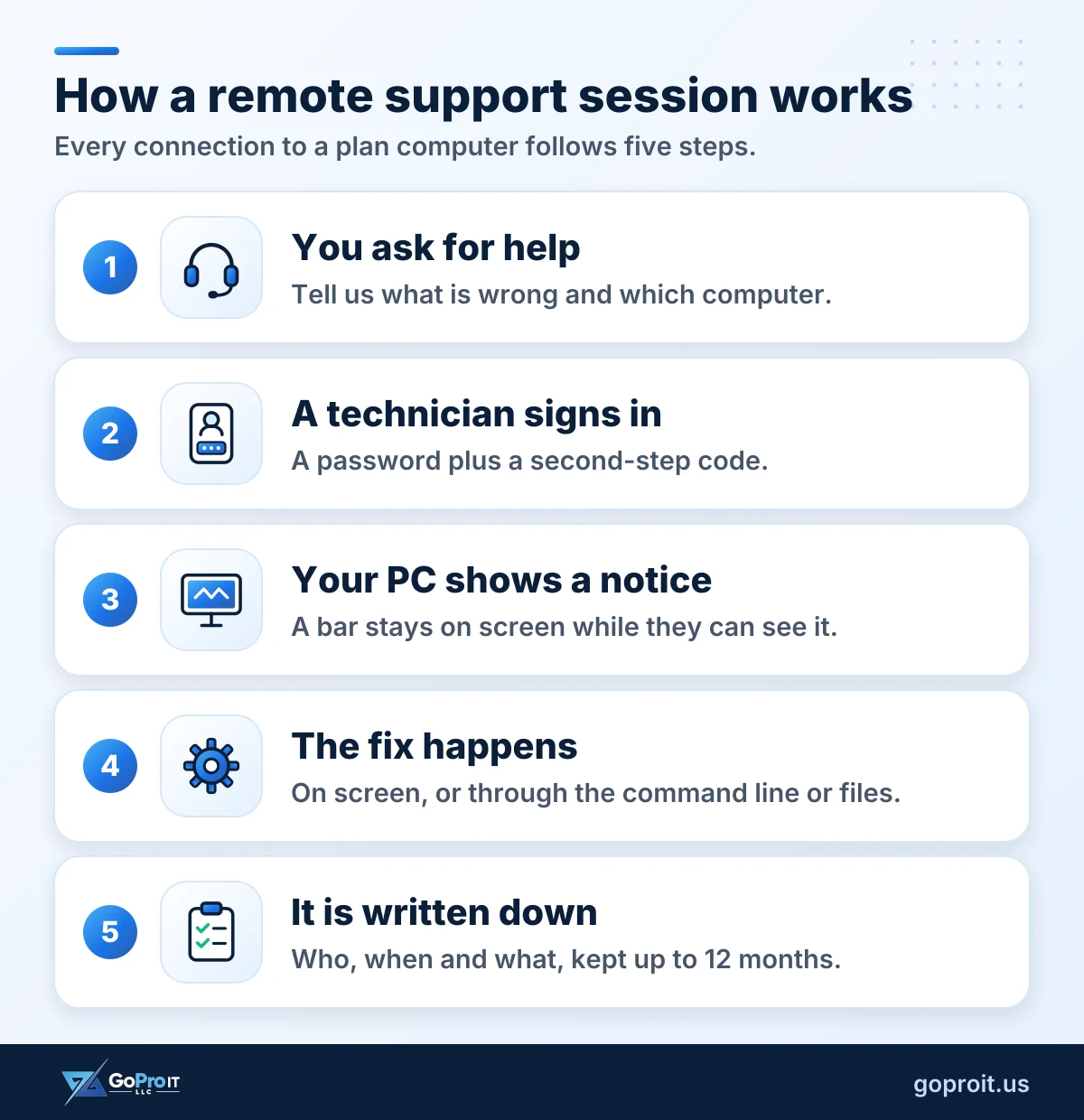
- You tell us what is wrong. Send the request the way you normally reach us. A short description and the name of the computer are enough to start.
- A technician signs in. They sign in to the console with two-step login, then open your computer from the list.
- Your computer shows a notice. It tells whoever is at the PC that a remote session has started. If the technician is viewing the screen, a bar stays visible for as long as they are connected.
- The technician does the work. Sometimes that happens on your screen. Sometimes it happens through the command line or the file browser, which also show a notice, and your desktop is left alone.
- It is written down. When the technician disconnects, the bar disappears and the session is closed. The record keeps who connected, when, and what kind of session it was.
If you are at the computer you can usually keep working, or just watch. A technician sees whatever is on the display during a screen session, so close anything private first.
Want support that works this way?
The Business Support Plan covers remote help for each person on your team: $49 per user per month, no minimum, month-to-month. Only one problem right now? A one-time remote fix is $59.
Why this is a better way to look after office PCs
Secure remote access is not only about safety. It changes how fast things get fixed.
- Nobody has to wait by the PC. The person who reported the problem can be in a meeting, with a customer or at lunch while we work.
- Fixes start sooner. There is no link to email, no code to read out and no “can you click Allow for me?” The technician opens the computer and starts.
- Slow jobs move out of your way. Updates and cleanups can run early or late in the day, inside our support hours, when nobody needs the machine.
- Remote staff get the same help. A laptop on a kitchen table is as reachable as the PC at the front desk, as long as it is online.
- There is a trail. If you ever want to know who connected to a computer and when, the answer exists.
For a small office, most everyday problems can be handled this way. The ones that cannot are physical, and we compare the two approaches in remote IT support versus on-site visits.
What it cannot do, and what you should know
A fair description includes the limits.
- The computer has to be turned on and online. We cannot reach a PC that is off, asleep or disconnected.
- It does not repair hardware. A dead drive or a cracked screen still needs hands.
- Routine maintenance commands and scripts run in the background without a notice, so they do not interrupt you. They are logged with the technician’s name.
- If BitLocker disk encryption is on, the software stores the recovery key on our server, so we can help if you are ever locked out.
- Our support team is US-managed, with engineers in the United States and overseas, so your computer may be accessed from outside the United States.
- You can have the agent removed from any computer at any time. A computer without it cannot receive unattended support.
What the software collects, and how long we keep it, is listed in our privacy policy. And if a caller you were not expecting asks to connect to your computer, treat it the way you would a fake virus warning: stop, and contact us through the details on this site.
Common questions
Is unattended remote access safe?
It is as safe as the controls around it. Ours needs two-step login from every technician, shows a notice on the computer whenever someone opens the screen, the command line or the files, and logs each connection with a name, a date and a time. The Remote Support agent connects only to our own server. No remote access tool is free of risk, which is why those controls are written into our terms and privacy policy.
Can a GoProIT technician connect without me knowing?
Not to your screen, command line or files. Each of those shows a notice on the computer, and a bar stays on screen for as long as a technician can see the display. Routine maintenance such as health checks and scripts runs in the background without a notice, and it is logged with the technician’s name. If nobody is at the PC when a notice appears, the session is still in our log, and you can ask us what it shows.
Who exactly can access my computer?
Only authorized GoProIT technicians, and they sign in with two-step login. Our support team is US-managed and includes engineers in the United States and overseas, so a connection may come from outside the United States. We say that in our privacy policy too, because you should not have to guess.
When do you connect to a computer?
For two reasons only: to work on a request you made, or to carry out maintenance we told you about in advance. Our support hours are Monday to Friday, 8am to 8pm Eastern. If a connection ever surprises you, ask us about it. The record shows which technician it was and when.
Do you record remote sessions?
No. We do not record remote sessions. What we keep is a log entry: which technician connected, to which computer, when, and what kind of session it was. If that ever changes, our privacy policy will be updated before any recording starts.
Can you see my files or read my email?
During a screen session the technician sees whatever is on the display, and can open files on the computer when the job calls for it. Technicians are instructed to access only what is needed for your request. The software does not read your documents, email or browsing history on its own, and it does not record what you type. Close anything private before a session where you can.
What is the difference between attended and unattended access?
Attended access needs you: you approve the connection and usually watch the fix. Unattended access uses an installed agent, so a technician can connect when nobody is at the PC. We use attended sessions for one-time fixes and unattended access for computers on the Business Support Plan.
What should I look for in secure remote desktop software?
Five things. Technician logins that need a second step, not just a password. A visible notice on the computer when someone connects. A log of every session that is kept for months, not days. An encrypted connection. And a provider who will tell you who runs the server and who can sign in to it. If a support company cannot answer those quickly, keep asking.
Do I need to change anything on my firewall or router?
Usually not. The agent makes an outgoing encrypted connection to our server at rmm.goproit.us, in the same direction as ordinary web browsing. If your office blocks outgoing traffic by default, whoever manages the firewall needs to allow that address.
Why does Windows warn me when I open the installer?
Microsoft Defender SmartScreen shows a caution for any installer that is not on its list of well-known, frequently downloaded files, and ours is a small private one. Check that the link came from your GoProIT technician and that the download address is rmm.goproit.us. If anything looks different, stop and call us before you run it.
How do I know it is really GoProIT connecting and not a scammer?
We connect after a request from you, or for maintenance we have already told you about. If someone calls claiming to be GoProIT and you were not expecting it, do not let them connect. Hang up and contact us through the details on our website, and we will check whether it was one of our technicians.
Is this the same as Windows Remote Assistance or Quick Assist?
No. Windows Remote Assistance and Quick Assist are built into Windows, and someone at the computer has to start or accept every session. That suits a one-off favor between colleagues. Our agent stays installed, works when nobody is at the PC, and adds technician logins, notices and a log on top.
Is remote access for IT support normal in a small business?
Yes. Remote access is how most IT support is delivered now, for five-person offices as much as for large ones. What differs between providers is the control around it: who can sign in, what you see when they connect, and what record is kept. Those are the questions worth asking.
Can the agent go on a personal or home computer?
Only if the computer is covered by your plan and you have the authority to allow it. Our terms ask you to confirm that, and to tell the people who use each computer that remote support is in place. For a home PC that is also used for work, talk to us before anything is installed.
Does the agent slow my computer down?
It should not. It is a small program that mostly waits for a technician to connect. If a PC feels slow, the cause is nearly always something else, such as a full drive, too little memory or a program stuck in the background, and that is exactly the kind of thing we would look into.
Can you connect while I am using the computer?
Yes, and it is often the quickest way. You will see the notice and the bar, and you can watch what the technician does or carry on with something else. If the timing is bad, tell the technician and pick a better time.
What happens if an employee leaves or a laptop is lost?
Tell us right away. When someone leaves, we work through the offboarding steps you ask for on that computer. For a lost or stolen laptop, the agent can only be reached if the device comes back online, so the first moves are changing passwords and signing the device out of your accounts.
What if a technician’s password were stolen?
That is the situation two-step login exists for: a stolen password on its own does not get someone into the console from their own device. Screen, command line and file sessions also show a notice on the computer, and every session is logged. If you ever see a session you did not expect, contact us.
How do I remove the agent?
Ask us and we will remove it, or run the installer again and choose Uninstall. Once it is gone, that computer cannot receive unattended support. When a plan ends we remove the software or tell you how, and we delete the device record from our server within 30 days.
What do you keep on record, and for how long?
Device details are kept while the software is installed. The record of technician connections is kept for up to 12 months, and is deleted earlier if the device record is deleted. When the software is removed or your plan ends, we delete the device record within 30 days. Deleted information can remain in our backups for about two weeks.
Who runs the remote access server?
GoProIT LLC does. The server is at rmm.goproit.us. We run the software ourselves instead of renting a hosted remote desktop service, so the list of your computers and the connection records are not held by a remote access vendor.
Does unattended access work on a Mac?
Yes. The remote support agent has a Mac version and a Linux version as well as the Windows one. Mac and Linux installs are new for us, so tell us what you have and we will do the first install with you. The monitoring agent is a separate tool and is for Windows only.
Do I need unattended access if I only want one problem fixed?
No. A one-time remote fix uses a temporary connection that you approve at the start, and nothing stays installed afterwards. Unattended access is for offices that want ongoing support without arranging a session every time.
Do you sell the information the software collects?
No. We do not sell it, and we do not share it with advertisers. It is used to connect to the right computer, to diagnose and fix problems, and to keep a record of who did what on which computer and when.