


RMM stands for remote monitoring and management. It is the software an IT provider uses to keep an eye on your computers from a distance, and to maintain them without a visit.
In practice it is a small program, called an agent, on each PC. The agent reports how the computer is doing. A console on the provider’s side collects those reports and lets a technician act on them.
We use one on Business Support Plan computers. This is what ours does, what it sees and what it leaves alone.
The short version
- RMM means remote monitoring and management: an agent on each PC, and a console on our side.
- Ours checks free disk space, processor and memory load, whether the PC is online, and which programs and Windows updates are installed.
- It lets us install Windows updates on a schedule we agree on with you, and run maintenance in the background.
- It does not read your documents, email or browsing history, and it does not record what you type.
- It is part of the Business Support Plan. Windows lists it as “Tactical RMM Agent” and “Mesh Agent”.
What RMM stands for, and what RMM tools do
You will see the same idea sold under a handful of names: RMM software, RMM tools, an RMM platform, remote monitoring software, remote management tools. They all describe the same two jobs.
Monitoring is the watching. The agent runs checks on a schedule and raises a flag when one fails: a drive that is nearly full, a PC that keeps running out of memory, a machine that has dropped offline.
Management is the doing. From the console a technician can install updates, run a script, restart a Windows service or remove a program, on one computer or on twenty.
IT providers bother with this for a simple reason. Without RMM, the first sign of trouble is a call from someone who cannot work. With it, many problems show up as a line on a screen while they are still small.
That is the difference between managed IT services and waiting for things to break, and it is what people mean by proactive IT support.
What the GoProIT monitoring agent checks
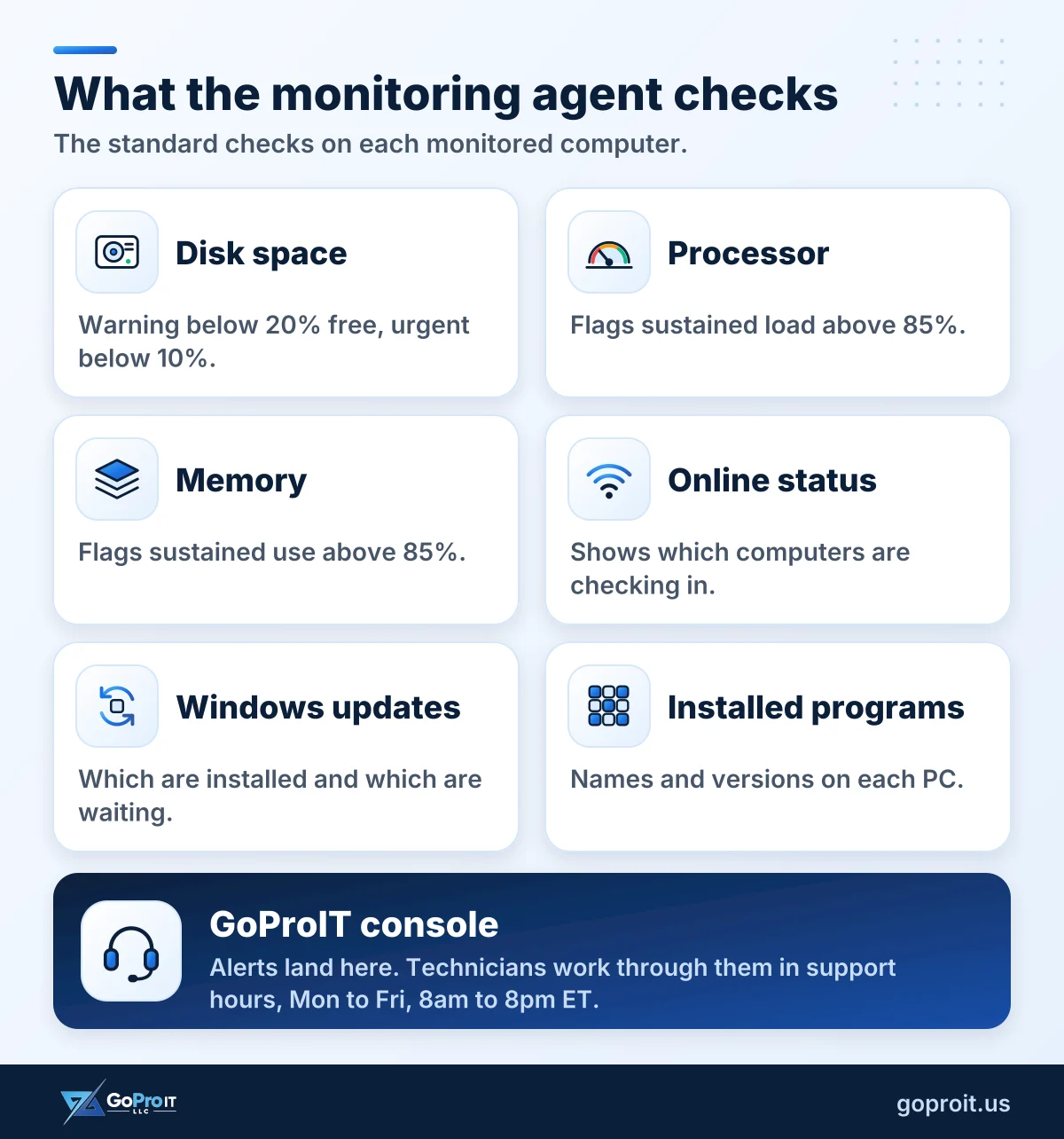
Our monitoring agent is built on Tactical RMM, a remote monitoring and management tool that we host on our own server. These are the standard checks on each monitored computer.
| Check | What it watches | Why it matters |
|---|---|---|
| Disk space | Free space on the main drive. A warning below 20 percent free, an urgent alert below 10 percent. | A full drive stops updates, email and saving files. |
| Processor | Sustained load above 85 percent. | Points to a runaway program, or a PC that is too small for its job. |
| Memory | Sustained use above 85 percent. | The usual reason a computer crawls with a few programs open. |
| Online status | Whether the computer is checking in. | Shows which machines we can reach before we plan any work. |
| Windows updates | Which are installed and which are waiting. | Tells us which PCs have fallen behind on security fixes. |
| Installed programs | Names and versions. | Answers “who still has the old version?” without a walk around the office. |
Those thresholds are our starting point. We tune them for a machine that has a good reason to run hot, and we can add a check for a specific fault, such as a Windows service that keeps stopping.
When a check fails, it appears as an alert on our console. Technicians work through alerts during support hours. If the fix means connecting to the computer, we tell you first, as our agent terms require.
Patch management: Windows updates without the nagging
Patch management is the unglamorous half of RMM, and probably the most useful. CISA’s advice to everyone is to install updates promptly, because many of them exist to fix security risks. In an office, that advice usually fails at the “Remind me later” button.
With the agent in place we can see which Windows updates each PC is missing, and install them from one place. That is automated patch management: security patching that is approved and scheduled centrally instead of left to each person.
Two rules keep Windows patching from becoming a nuisance, and both are in our terms:
- Before automatic updates are turned on for your computers, we agree on the timing with you.
- We do not restart a computer during your working hours without asking first.
Now and then an update misbehaves on one machine. When that happens we deal with that machine. Our guide to a Windows update that is stuck shows what it looks like from the user’s chair.
How we set it up on your computers
Setting up remote monitoring takes a few minutes per computer and one short conversation.
- We agree on which computers are covered. Usually that is every Windows PC your team works on.
- The agent is installed. Your technician sends an installer made for your company, or installs it with you on a call.
- The computer appears on our console. Within a few minutes we can see its name, Windows version, hardware and installed programs.
- The standard checks start. Disk, processor and memory checks begin on their own.
- We agree on the update schedule. Nothing is patched automatically until the timing is settled with you.
- You tell your team. Our terms ask you to let the people who use each computer know that monitoring and remote support are in place.
What you will see in Windows afterwards, and how to have the software removed, is on the monitoring agent page.
Want your PCs looked after like this?
Monitoring, patching and remote help are part of the Business Support Plan: $49 per user per month, no minimum, month-to-month. Start with a free IT assessment and we will tell you plainly what it covers for your office.
What it collects, and what it leaves alone
Monitoring software earns suspicion, so here is what ours gathers.

It collects the computer’s name, Windows version and hardware details including serial numbers, its network addresses including the public IP address, and the Windows user name of whoever is signed in.
It also reports which programs, Windows updates and Windows services are on the computer, security basics as Windows sees them (antivirus and firewall status, whether disk encryption is on, whether a restart is pending), the results of health checks, and the commands and scripts we run, with their output.
When a technician is working on the computer, or when we set up a check for a specific fault, it can also read the list of running programs and entries in the Windows event log.
It does not read your documents, emails or browsing history, and it does not record what you type. We do not record remote sessions.
Only authorized GoProIT technicians can see this information, and they sign in with two-step login. It is kept on servers operated by GoProIT LLC, and in backups of those servers. We do not sell it or share it with advertisers.
Three things surprise people, so we would rather say them up front:
- If BitLocker disk encryption is on, the recovery key is stored on our server. That is the 48-digit number Windows asks for when it locks a drive, and holding it means we can help you back in. Our guide to the BitLocker recovery key explains when Windows asks for it.
- The agent asks a public “what is my IP address” service for the computer’s public address, and it downloads its own updates from the software maker’s download site on GitHub.
- Health checks, updates and maintenance scripts run in the background without a notice. Viewing your screen is different: that always shows a notice, as explained in how our unattended remote access works.
Check results and maintenance records are kept for up to 60 days, and the log of what each technician did for 12 months. The full list of what the software collects is in our privacy policy.
CISA’s advisory for IT providers and their customers says customers should have visibility of what a provider does on their systems. Ours works on request: ask, and we will tell you which of your computers have the software and send you a copy of the records we hold.
Why monitored PCs are easier to live with
The benefits are small, practical and easy to miss, because the whole point is that less goes wrong.

- Small problems stay small. A drive that is 80 percent full is a quick cleanup. The same drive at 100 percent is a lost morning.
- Updates get installed. Not when someone remembers, and not in the middle of a client call.
- Answers are faster. When you ask which laptops are too old for the new software, we look it up instead of walking around the office.
- Onboarding and offboarding are quicker. We already know each machine, what is on it and what it needs.
- Fewer interruptions. Routine IT maintenance happens in the background, not on your screen.
- One record. Every command and script a technician runs is logged with their name, the date and the time.
None of this is exotic. Large companies have worked this way for years. RMM services bring the same approach to an office of five or fifteen people.
What RMM does not do
It helps to know where the edges are.
- It is not antivirus. Stopping malware is the job of the endpoint protection that comes with the plan.
- It is not a backup. It does not back up your files.
- It does not watch your network gear. The agent monitors the Windows computers it is installed on, not routers, switches or printers.
- It cannot see a computer that is off. Checks pick up again when the machine comes back online.
- It is not a person staring at a screen all night. The agent checks at any hour the PC is on. Technicians act on alerts during support hours, Monday to Friday, 8am to 8pm Eastern.
- It is for Windows today. If you have Macs, ask us what we can cover.
Common questions
What does RMM stand for?
Remote monitoring and management. Monitoring means an agent on each computer checks its health and reports back. Management means a technician can act on what the agent reports, for example by installing updates or running a fix, without visiting the office. RMM tools, RMM software and RMM platform are different names for the same thing.
Is RMM a kind of spyware or employee monitoring?
No. Our agent watches the health of the computer, not the person using it. It does not read documents, email or browsing history, it does not record what you type, and we do not record remote sessions. It does report the Windows user name of whoever is signed in, and a technician working on a fault can see which programs are running. Both are stated in our privacy policy.
What exactly does the monitoring agent collect?
Device details such as the computer name, Windows version, hardware, serial numbers and network addresses. The Windows user name of the person signed in. Installed programs, Windows updates and Windows services. Security status as Windows reports it. Health check results. And the commands and scripts we run, with their output. The full list is in the remote support and device management section of our privacy policy.
Can you see my screen through the monitoring agent?
A technician can open a remote session through it, and when they do the computer shows a notice. While they can see the screen, a bar stays on screen until they disconnect. The health checks themselves never look at your screen. They read numbers such as free disk space and memory use.
Will the agent slow my computer down?
It should not. It runs light checks every couple of minutes and otherwise waits. If a PC is slow, the agent is more likely to help us find the reason, such as low memory or a full drive, than to be the reason.
How do Windows updates work once the agent is installed?
We can see which updates each PC is missing and install them from our console. Before automatic updates are turned on, we agree on the timing with you. That agreed schedule is the whole patch management process from your side: we settle the window together, and we handle the Windows update management inside it.
Will my computer restart in the middle of my work?
Not by us without asking. Our terms say we do not restart a computer during your working hours without asking first. Windows can still prompt for a restart after an update, which is one reason we agree on an update schedule with you in advance.
What happens when a check fails?
It shows up as an alert on our console, with the computer’s name and what went wrong. Technicians work through alerts during support hours. If the fix means connecting to the computer, we tell you first, unless it is maintenance we have already told you about.
Do you monitor computers at night and on weekends?
The agent keeps checking whenever the computer is on, at any hour. Our technicians work Monday to Friday, 8am to 8pm Eastern. An alert raised on a Saturday night waits on the console until support hours start again.
What is the difference between RMM and antivirus?
Antivirus, or EDR, looks for malicious software and stops it. RMM looks after the health and upkeep of the computer: disk space, updates, performance and inventory. They do different jobs, and the Business Support Plan includes both.
How is the monitoring agent different from GoProIT Remote Support?
The monitoring agent watches each computer and handles maintenance in the background. GoProIT Remote Support is the tool a technician uses to connect to the screen and fix a problem with you. A plan computer may have one or both.
Why does Windows list Tactical RMM Agent and Mesh Agent in my programs?
Those are the two parts of the monitoring agent. It is built on Tactical RMM, which uses a Mesh Agent for remote sessions. On a computer covered by our plan, those names are our software. If you find them on a computer that is not on our plan and nobody can say who installed them, tell your IT contact.
Why does GoProIT use Tactical RMM?
Because we can run it on our own server. The information the agent reports is kept on servers operated by GoProIT LLC and in backups of those servers, not in an RMM vendor’s cloud, and we control who can sign in. We are a user of the software and are not affiliated with its makers.
Does the agent handle server patching too?
The agent runs on Windows Server as well as Windows 10 and 11. Server patching needs more care, because one restart affects everyone at once, so the timing is agreed with you first, exactly as it is for automatic updates on PCs. Tell us what the server runs before we set anything up.
Does it monitor our network, Wi-Fi or printers?
No. IT network monitoring is a different job. The agent monitors the Windows computers it is installed on. Routers, switches, Wi-Fi access points and printers are not covered by it. If the office internet is slow or a printer is offline, tell us and we troubleshoot it the usual way.
Is the BitLocker recovery key really stored with you?
Yes, if BitLocker is turned on. The software stores the recovery key on our server, so we can help you unlock the computer if Windows asks for the key and you cannot find your copy. You should still keep your own copy somewhere safe.
How long do you keep the monitoring data?
Health check results and maintenance records for up to 60 days. The log of technician actions for 12 months, even if the computer is removed in the meantime. The device record itself is deleted within 30 days of the software being removed or your plan ending. Deleted information can remain in backups for about two weeks.
Can I log in to the console and see my own computers?
No. The console is for our technicians, and there are no customer logins. You can ask us at any time which of your computers have the software, and for a copy of the records we hold about them.
Does the agent contact anything besides GoProIT?
Its reports go to our own servers. It also asks a public IP lookup service for the computer’s public address, and it downloads its own updates from the software maker’s download site on GitHub. When we install a program for you, that program comes from its publisher or from the Chocolatey package service.
How do I remove the monitoring agent?
Ask us and we will remove it from any computer at any time, or send you the steps to do it yourself. A computer without the agent cannot be monitored or receive unattended support. When a plan ends, we remove the software or tell you how.
Is RMM worth it for a very small office?
It matters more, not less. A five-person office has nobody whose job is to notice that a laptop has missed three months of updates. The agent notices. And it is not an add-on to buy: it is part of how the Business Support Plan is delivered.
Do my staff need to do anything differently?
No. There is nothing to open and nothing to sign in to. The one request is to leave computers turned on at the times we have agreed on for updates, because the agent cannot patch a PC that is off.
Do you install the monitoring agent for a one-time fix?
No. A one-time fix uses a temporary connection that you approve at the start, and nothing stays installed afterwards. The monitoring agent is only for computers on the Business Support Plan.
What is the difference between IT maintenance and RMM?
IT maintenance is the work: updates, cleanups, checking that things still run. RMM is the tool that makes that work regular. Without it, IT maintenance services depend on someone remembering to look. With it, the checks run by themselves and the technician deals with what they find.